Turn site photos into
workplace safety insights .
Review potential hazards in photos, edit findings and prepare a report draft with Fine–Kinney or 5×5 scoring. New analyses start with a camera or gallery photo; there is no text-only new-analysis input. Final assessment requires site knowledge and professional review.


You spotted the hazard,
but never found time to write it up?
Recording site observations helps teams review and follow up.
Photos, notes and reports can become scattered. A consistent record helps with following up findings.
From site to report,
support for professional review.
Illustrative site scene: connect photos, findings and reports. A photo cannot establish that all hazards have been found or that a workplace is safe.

Site survey and risk assessment in four steps.
From AI draft to professional review.
Review potential hazards in photos, edit findings and prepare a report draft with Fine–Kinney or 5×5 scoring. Final assessment requires site knowledge and professional review.
Review the photo.
Verify findings, then report.
AI suggestions may be incomplete or inaccurate. Check site conditions and proposed controls before sharing a report.
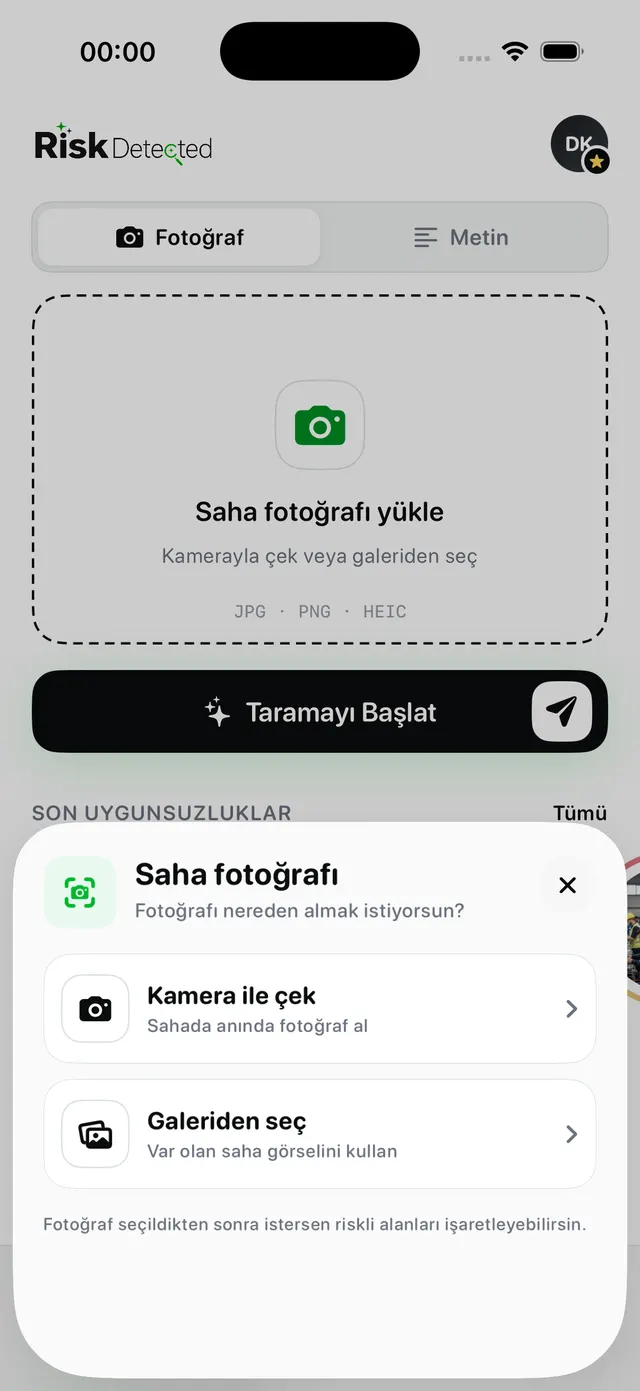
Capture the site photo
Shoot it on the spot or pick from your gallery. JPG, PNG, HEIC.
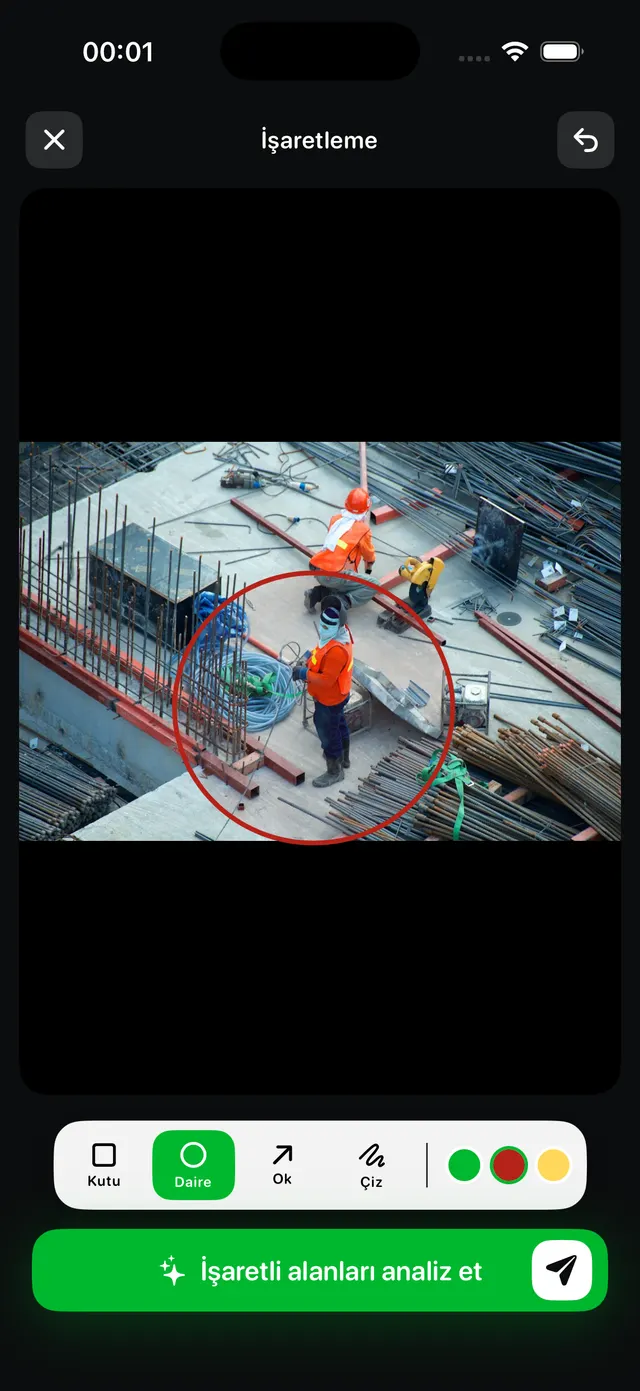
Mark the hazard areas
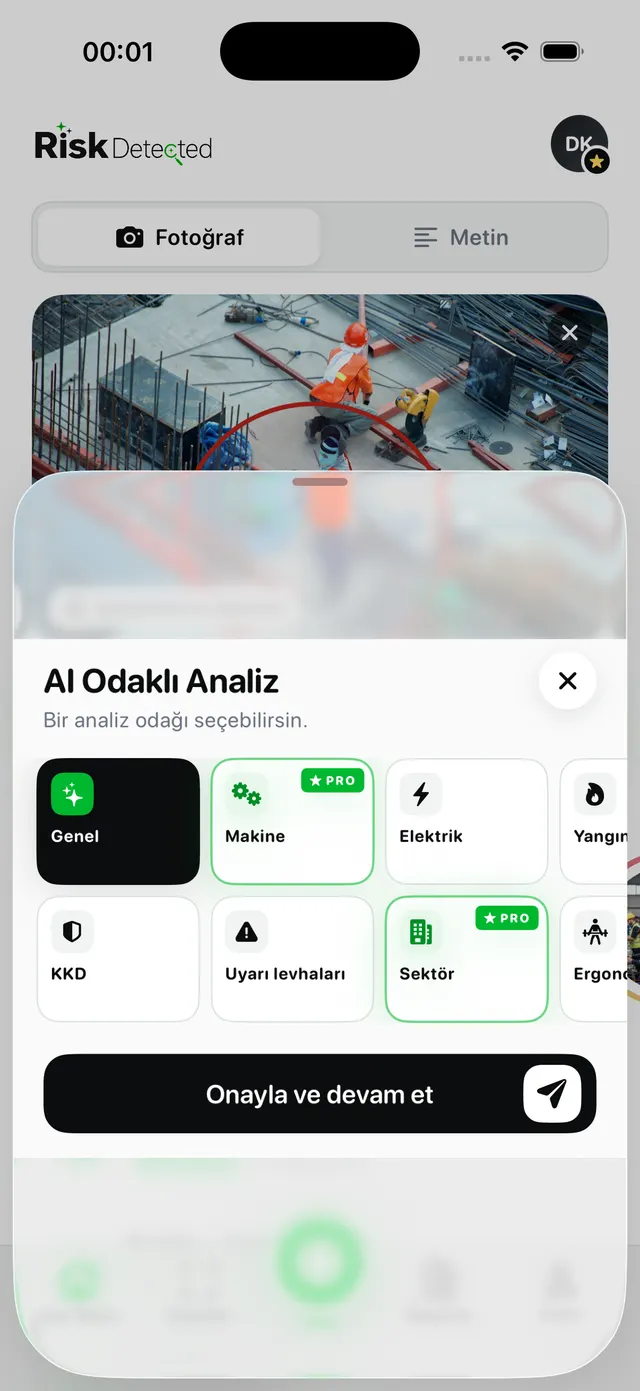
Use a box, circle, arrow or freehand to show the AI where to focus.
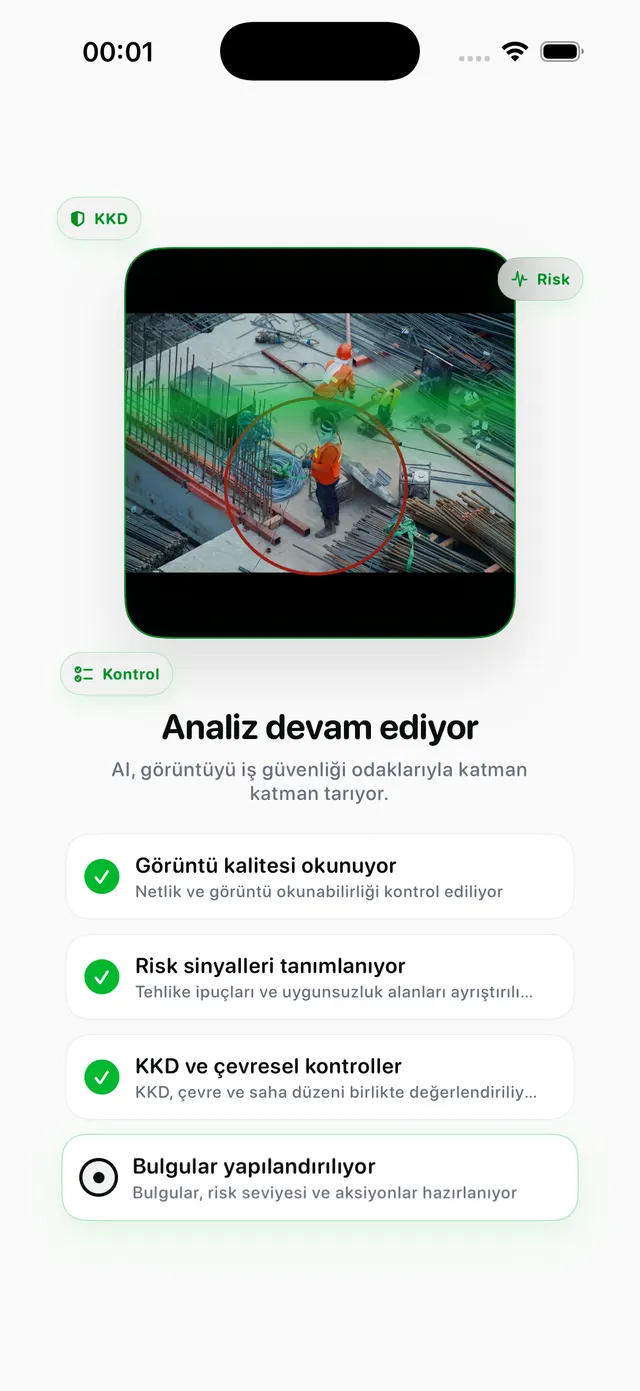
Run the AI analysis
Pick a focus: General, PPE, Machinery, Electrical, Fire, or by sector.
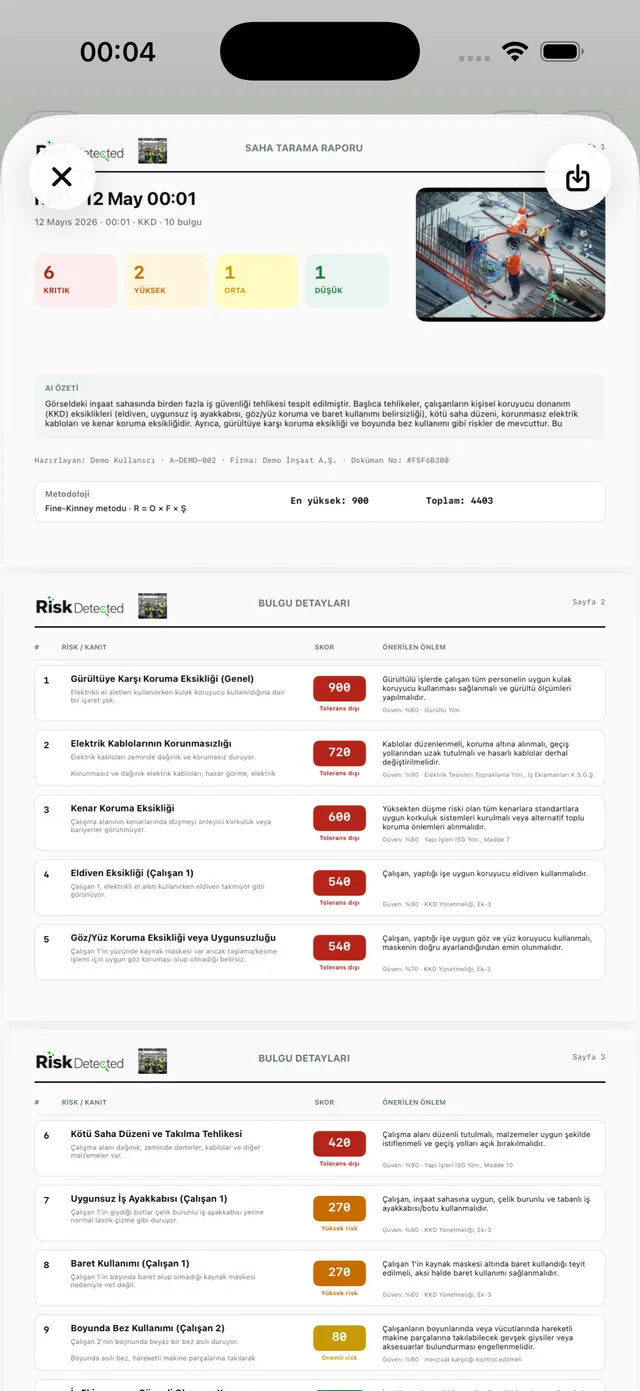
Review and export
A PDF/Excel report scored with Fine-Kinney or the 5×5 matrix.
Guidance at every stage of the safety professional’s work.
Focus the review on relevant hazards.
Use analysis options to review visible work areas and equipment. Hidden details, measurements and technical condition need separate verification.
- Visible PPE and work areas
- Visible machinery and electrical hazards
- Focus on marked areas
- Add site context to findings
Two methods, one interface. R = P × F × S.
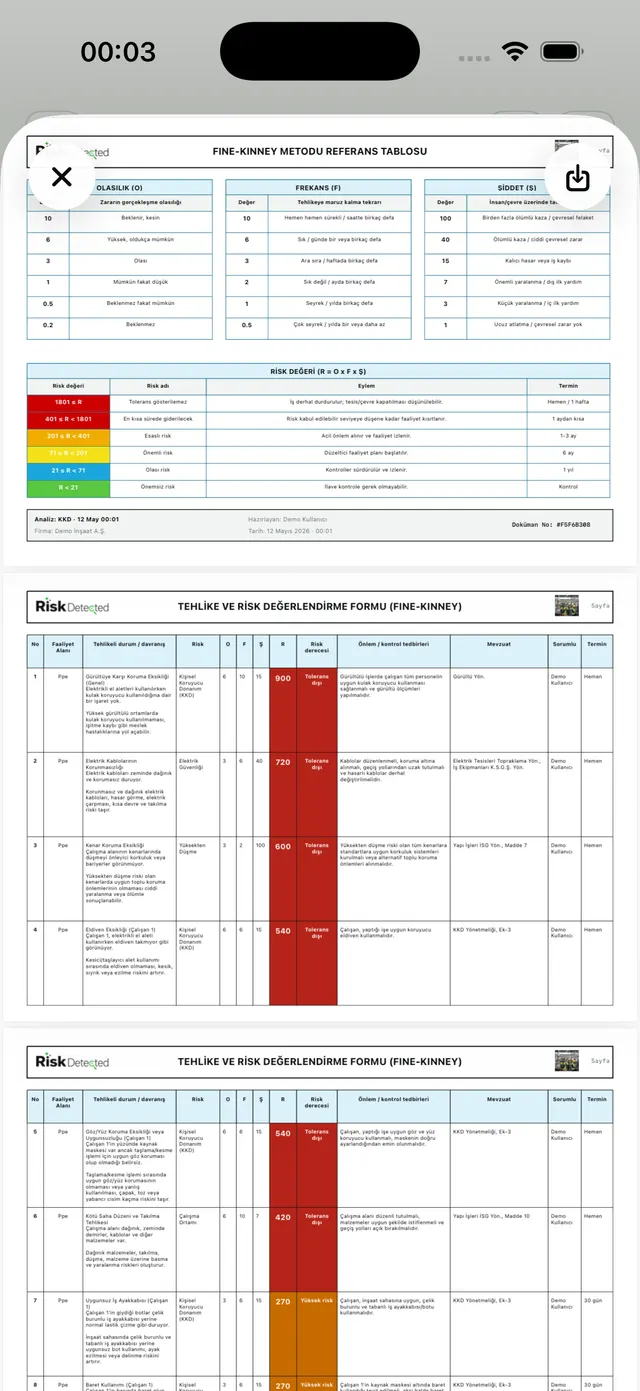
For every finding the AI proposes probability, frequency and severity values — you review and confirm them. The risk distribution (Crit/High/Med/Low) is visible at a glance.
- Fine–Kinney: likelihood × severity × frequency
- 5×5: likelihood × severity
- Verify scores against site conditions
- Review and edit suggestions
A reviewable workflow. PDF and Excel export.
A PDF customised with your organisation logo, preparer, company and document number fields. Export the same data to an Excel table and file it in your archive.
- Review content before sharing
- Check company and preparer details
- Check available options in the app
- Verify the exported document
Scoring supports assessment.
Fine–Kinney and 5×5 help prioritise findings. A score alone does not prove safety or legal compliance.
R = P × F × S
Likelihood, severity and exposure frequency are considered together. Check the scales and thresholds for the method being used.
R = L × S
A two-variable visual matrix. Preferred for fast site walks.
AI suggestions may be incomplete or inaccurate. Check site conditions and proposed controls before sharing a report.
Verify references against their source.
Check the currency, scope and applicability of suggested references. A photo does not replace measurements or an on-site inspection.
Find the current source
Compare suggested references with official publications.
Check applicability
Consider the activity, equipment and actual working conditions.
Complete professional review
Do not treat AI output as certification or an official approval.
Fine–Kinney and 5×5 help prioritise findings. A score alone does not prove safety or legal compliance.
From App Store users
Short excerpts from the Türkiye App Store, shown in their original Turkish. Professional credentials have not been verified.
Türkiye App Store · 4.7 / 5 · 14 ratings ·
“Özellikle risk analizi ve uzman görüşünden oldukça fazla faydalandım.”6 Eylül 2026 · App Store
Read the source in the store“Uzman görüşü ve eğitim önerileri kısmı çok iyi.”4 Eylül 2026 · App Store
Read the source in the store“Şantiyem için çok rahat ettim.”22 Ağustos 2026 · App Store
Read the source in the storeFree · Plus · Pro
Check current prices, features, usage limits and trial terms in your store and the app subscription screen.
Terms may vary by platform, country and account. Opening a store does not start a subscription.


Bring an assistant along
on your next site walk.
RiskDetected is available on iOS and Android. Check the relevant store for current features and subscription terms.